




Skip to content
View in the app

A better way to browse. Learn more.

Gamercide

A full-screen app on your home screen with push notifications, badges and more.

To install this app on iOS and iPadOS
  1. Tap the Share icon in Safari
  2. Scroll the menu and tap Add to Home Screen.
  3. Tap Add in the top-right corner.
To install this app on Android
  1. Tap the 3-dot menu (⋮) in the top-right corner of the browser.
  2. Tap Add to Home screen or Install app.
  3. Confirm by tapping Install.
Welcome back to Gamercide!

Fatal Frame V: The Black Haired Shrine Maiden Remains Japan Exclusive

  • For fans of the horror series Fatal Frame who were hoping to soil themselves here stateside with the already released Japan released version of Fatal Frame V: The Black Haired Shrine Maiden, you are in for some bad news.

The developer behind the fifth installment of the Fatal Frame series, Koei Tecmo Europe announced over Twitter that Fatal Frame V: The Black Haired Shrine Maiden will remain a Japan exclusive.
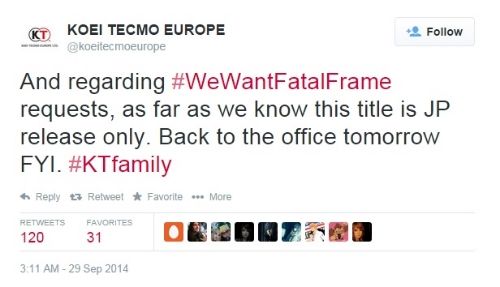
Tecmo_zps1728ddbb.jpg

Since the announcement, fans have been calling out the developer over Twitter calling them "lazy" and basically accusing them of being stupid. Whether or not you agree with the high school name calling, at least we can all agree on one thing. Our underwear gets to live on another day without being in fear of another Fatal Frame game entering into our lives.

via Twitter

User Feedback

Recommended Comments

ThermoNukePanda

Live Casters

Apparently some people are mad about the "fan service" in the game also (i.e. the extra bikini costumes)

PaNfOoT

Member+

Didn't 4 stay a japanese exclusive too?

MadMikeMan

Member+

This is a great shame. I was really looking forward to it.

Please sign in to comment

You will be able to leave a comment after signing in

Sign In Now

Members

No members to show

Member Statistics

  • 523 Total Members
  • 1640 Most Online
  • iceesnowman Newest Member ·

Account

Navigation

Search

Search

Configure browser push notifications

Chrome (Android)
  1. Tap the lock icon next to the address bar.
  2. Tap Permissions → Notifications.
  3. Adjust your preference.
Chrome (Desktop)
  1. Click the padlock icon in the address bar.
  2. Select Site settings.
  3. Find Notifications and adjust your preference.