





Skip to content
View in the app

A better way to browse. Learn more.

Gamercide

A full-screen app on your home screen with push notifications, badges and more.

To install this app on iOS and iPadOS
  1. Tap the Share icon in Safari
  2. Scroll the menu and tap Add to Home Screen.
  3. Tap Add in the top-right corner.
To install this app on Android
  1. Tap the 3-dot menu (⋮) in the top-right corner of the browser.
  2. Tap Add to Home screen or Install app.
  3. Confirm by tapping Install.
Welcome back to Gamercide!

New Xbox 360 Controller Design Announced

Major Nelson released a video showing the new Xbox 360 controller that is slated for November 9th.  It sports a newly improved D-Pad and new more comfortable triggers, as well as newly colored face buttons..  The D-Pad twists and becomes an actual D-Pad instead of the disc based pad of the current design.  The new controller will sell in a Play And Charge Kit for $64.99.  It remains to be seen how well it performs, so I'll reserve judgment until I get my hands on one.

Take a look at the video below and let us know what you think in the comments or on the forums.

Quick edit:  The video with Major Nelson doesn't show it well, so here is a closeup of the new D-Pad in both positions.
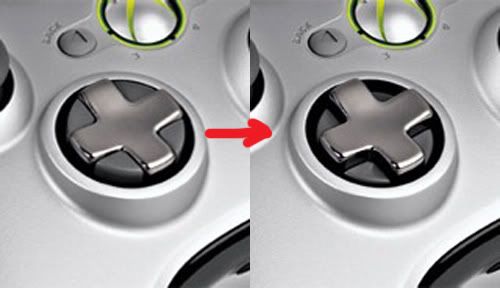
360D-PadChange.jpg

User Feedback

Recommended Comments

There are no comments to display.

Please sign in to comment

You will be able to leave a comment after signing in

Sign In Now

Members

No members to show

Member Statistics

  • 523 Total Members
  • 1640 Most Online
  • iceesnowman Newest Member ·

Account

Navigation

Search

Search

Configure browser push notifications

Chrome (Android)
  1. Tap the lock icon next to the address bar.
  2. Tap Permissions → Notifications.
  3. Adjust your preference.
Chrome (Desktop)
  1. Click the padlock icon in the address bar.
  2. Select Site settings.
  3. Find Notifications and adjust your preference.